
9.8 KiB
Linux
This document collects knowledge, tips and tricks on all things Linux, that don't get their own document.
Setup and Configuration
Locales and Keyboard Layouts
Use localectl to display and configure locales and keyboard layout:
# show current locales
localectl status
configure layout 'US intl. with deadkeys'
To configure US intl. with deadkeys, set the following values:
 X11 Layout: us
  X11 Model: default
X11 Variant: intl
Linux commands
combine commands with xargs
Some commands (e.g. chmod) can't handle input via pipe and require the input as arguments.
xargs takes the standard input as list of arguments seperated by spaces or newlines and executes the given command with the input parsed to a list of arguments.
Usage:
find . -type f | xargs chmod 644
pipe output into clipboard
requires
xclip
One can save command output to the clipboard by piping it to xclip:
# usage
command | xclip -selection clipboard

# working example with 'echo'
echo "hello world" | xclip -selection clipboard
NOTE: the argument
-selection clipboardis required
permissions
Linux permissions are ordered as follows:
- owner
- group
- others
octal permissions
In octal representation the actions (read, write, execute) have the values:
- read = 4
- write = 2
- execute = 1
Terminal
ANSI escape sequences
Ansi escape sequences are used to format output in a terminal. They are prefixed with an escape character, which can be written in a few ways:
- Ctrl-Key
^[ - Octal
\033(\0 for octal) - Hexadecimal
\x1B(\x for hexadecimal) - Unicode
\u001b
The sequences is started with a [ followed by the command and arguments.
Arguments are separated with ;.
Sequences are terminated with m.
# Example:
\x1b[1;31m  # Set style to bold, red foreground.
For the following tables we define ESC = \x1B
Buffer Control
| Sequence | Description |
|---|---|
ESCc |
clear buffer |
Cursor Control
The following table lists codes to control the cursor:
| Sequence | Description |
|---|---|
ESC[H |
moves cursor to home position (0, 0) |
ESC[<line>;<column>H |
moves cursor to <line>, <column> |
ESC[<#>A |
moves cursor up # lines |
ESC[<#>B |
moves cursor down # lines |
ESC[<#>C |
moves cursor right by # columns |
ESC[<#>D |
moves cursor left by # columns |
ESC[<#>E |
moves cursor to beginning of next line, # lines down |
ESC[<#>F |
moves cursor to beginning of previous line, # lines up |
ESC[<#>G |
moves cursor to column # |
ESC[6n |
request cursor position (reports as ESC[#;#R) |
ESC M |
moves cursor one line up, scrolling if needed |
ESC 7 |
save cursor position (DEC) |
ESC 8 |
restores the cursor to the last saved position (DEC) |
ESC[s |
save cursor position (SCO) |
ESC[u |
restores the cursor to the last saved position (SCO) |
Text Style
| ESC Code Sequence | Reset Sequence | Description |
|---|---|---|
ESC[1;34;{...}m |
Set graphics modes for cell, separated by semicolon (;). |
|
ESC[0m |
reset all modes (styles and colors) | |
ESC[1m |
ESC[22m |
set bold mode. |
ESC[2m |
ESC[22m |
set dim/faint mode. |
ESC[3m |
ESC[23m |
set italic mode. |
ESC[4m |
ESC[24m |
set underline mode. |
ESC[5m |
ESC[25m |
set blinking mode |
ESC[7m |
ESC[27m |
set inverse/reverse mode |
ESC[8m |
ESC[28m |
set hidden/invisible mode |
ESC[9m |
ESC[29m |
set strikethrough mode. |
Note: Some terminals may not support some of the graphic mode sequences listed above.
Note: Both dim and bold modes are reset with the
ESC[22msequence. TheESC[21msequence is a non-specified sequence for double underline mode and only works in some terminals and is reset withESC[24m.
Color codes
Most terminals support 8 and 16 colors, as well as 256 (8-bit) colors. These colors are set by the user, but have commonly defined meanings.
8-16 Colors
| Color Name | Foreground Color Code | Background Color Code |
|---|---|---|
| Black | 30 |
40 |
| Red | 31 |
41 |
| Green | 32 |
42 |
| Yellow | 33 |
43 |
| Blue | 34 |
44 |
| Magenta | 35 |
45 |
| Cyan | 36 |
46 |
| White | 37 |
47 |
| Default | 39 |
49 |
| Reset | 0 |
0 |
Note: the Reset color is the reset code that resets all colors and text effects, Use Default color to reset colors only.
Most terminals, apart from the basic set of 8 colors, also support the "bright" or "bold" colors.
These have their own set of codes, mirroring the normal colors, but with an additional ;1 in their codes:
# Set style to bold, red foreground.
\x1b[1;31mHello
# Set style to dimmed white foreground with red background.
\x1b[2;37;41mWorld
Terminals that support the aixterm specification provides bright versions of the ISO colors, without the need to use the bold modifier:
| Color Name | Foreground Color Code | Background Color Code |
|---|---|---|
| Bright Black | 90 |
100 |
| Bright Red | 91 |
101 |
| Bright Green | 92 |
102 |
| Bright Yellow | 93 |
103 |
| Bright Blue | 94 |
104 |
| Bright Magenta | 95 |
105 |
| Bright Cyan | 96 |
106 |
| Bright White | 97 |
107 |
256 Colors
The following escape codes tells the terminal to use the given color ID:
| ESC Code Sequence | Description |
|---|---|
ESC[38;5;{ID}m |
Set foreground color. |
ESC[48;5;{ID}m |
Set background color. |
Where {ID} should be replaced with the color index from 0 to 255 of the following color table:
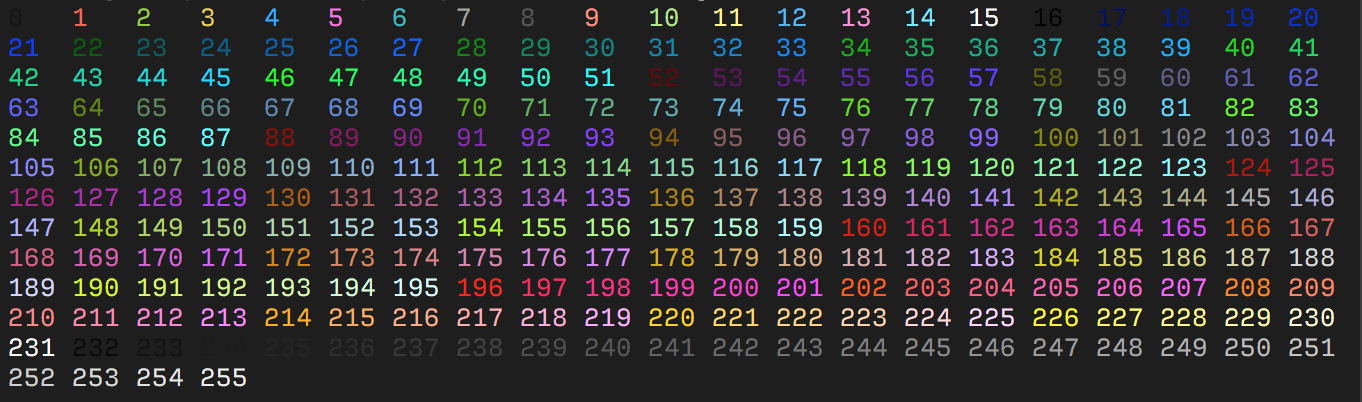
The table starts with the original 16 colors (0-15).
The proceeding 216 colors (16-231) or formed by a 3bpc RGB value offset by 16, packed into a single value.
The final 24 colors (232-255) are grayscale starting from a shade slighly lighter than black, ranging up to shade slightly darker than white.
Some emulators interpret these steps as linear increments (256 / 24) on all three channels, although some emulators may explicitly define these values.
RGB Colors
More modern terminals supports Truecolor (24-bit RGB), which allows you to set foreground and background colors using RGB. These escape sequences are usually not well documented.
| ESC Code Sequence | Description |
|---|---|
ESC[38;2;{r};{g};{b}m |
Set foreground color as RGB. |
ESC[48;2;{r};{g};{b}m |
Set background color as RGB. |
Note that
38and48corresponds to the 16 color sequence and is interpreted by the terminal to set the foreground and background color respectively. Where as;2and;5sets the color format.