
259 lines
9.8 KiB
Markdown
259 lines
9.8 KiB
Markdown
# Linux
|
|
|
|
This document collects knowledge, tips and tricks on all things Linux, that don't get their own document.
|
|
|
|
<!--toc:start-->
|
|
- [Linux](#linux)
|
|
- [Setup and Configuration](#setup-and-configuration)
|
|
- [Locales and Keyboard Layouts](#locales-and-keyboard-layouts)
|
|
- [configure layout 'US intl. with deadkeys'](#configure-layout-us-intl-with-deadkeys)
|
|
- [Linux commands](#linux-commands)
|
|
- [combine commands with *xargs*](#combine-commands-with-xargs)
|
|
- [pipe output into clipboard](#pipe-output-into-clipboard)
|
|
- [permissions](#permissions)
|
|
- [octal permissions](#octal-permissions)
|
|
- [Terminal](#terminal)
|
|
- [ANSI escape sequences](#ansi-escape-sequences)
|
|
- [Text Style](#text-style)
|
|
- [Color codes](#color-codes)
|
|
- [8-16 Colors](#8-16-colors)
|
|
- [256 Colors](#256-colors)
|
|
- [RGB Colors](#rgb-colors)
|
|
<!--toc:end-->
|
|
|
|
|
|
## Setup and Configuration
|
|
|
|
|
|
### Locales and Keyboard Layouts
|
|
|
|
Use `localectl` to display and configure locales and keyboard layout:
|
|
|
|
```sh
|
|
# show current locales
|
|
localectl status
|
|
```
|
|
|
|
|
|
#### configure layout 'US intl. with deadkeys'
|
|
|
|
To configure `US intl. with deadkeys`, set the following values:
|
|
|
|
```sh
|
|
X11 Layout: us
|
|
X11 Model: default
|
|
X11 Variant: intl
|
|
```
|
|
|
|
Use `localectl` to show the current settings.
|
|
|
|
|
|
## Linux commands
|
|
|
|
- [Linux commands](#linux-commands)
|
|
- [combine commands with *xargs*](#combine-commands-with-xargs)
|
|
|
|
|
|
### combine commands with *xargs*
|
|
|
|
Some commands (e.g. `chmod`) can't handle input via pipe and require the input as arguments.
|
|
`xargs` takes the standard input as list of arguments seperated by spaces or newlines and executes the given command with the input parsed to a list of arguments.
|
|
|
|
Usage:
|
|
```bash
|
|
find . -type f | xargs chmod 644
|
|
```
|
|
|
|
|
|
### pipe output into clipboard
|
|
|
|
> requires `xclip`
|
|
|
|
One can save command output to the clipboard by piping it to `xclip`:
|
|
|
|
```sh
|
|
# usage
|
|
command | xclip -selection clipboard
|
|
|
|
# working example with 'echo'
|
|
echo "hello world" | xclip -selection clipboard
|
|
```
|
|
|
|
> NOTE: the argument `-selection clipboard` is required
|
|
|
|
|
|
## permissions
|
|
|
|
Linux permissions are ordered as follows:
|
|
- owner
|
|
- group
|
|
- others
|
|
|
|
|
|
### octal permissions
|
|
|
|
In octal representation the actions (read, write, execute) have the values:
|
|
- read = 4
|
|
- write = 2
|
|
- execute = 1
|
|
|
|
|
|
## Terminal
|
|
|
|
- [ANSI escape sequences](#ansi-escape-sequences)
|
|
|
|
|
|
### ANSI escape sequences
|
|
|
|
Ansi escape sequences are used to format output in a terminal.
|
|
They **are prefixed with an escape character**, which can be written in a few ways:
|
|
|
|
- Ctrl-Key `^[`
|
|
- Octal `\033` (\0 for octal)
|
|
- Hexadecimal `\x1B` (\\x for hexadecimal)
|
|
- Unicode `\u001b`
|
|
|
|
The sequences is started with a `[` followed by the command and arguments.
|
|
Arguments are separated with `;`.
|
|
**Sequences are terminated with `m`.**
|
|
|
|
``` bash
|
|
# Example:
|
|
\x1b[1;31m # Set style to bold, red foreground.
|
|
```
|
|
|
|
For the following tables we define `ESC = \x1B`
|
|
|
|
|
|
#### Buffer Control
|
|
|
|
| Sequence | Description |
|
|
| :------- | :----------- |
|
|
| `ESCc` | clear buffer |
|
|
|
|
|
|
#### Cursor Control
|
|
|
|
The following table lists codes to control the cursor:
|
|
|
|
| Sequence | Description |
|
|
| :--------------------- | :----------------------------------------------------- |
|
|
| `ESC[H` | moves cursor to home position (0, 0) |
|
|
| `ESC[<line>;<column>H` | moves cursor to `<line>`, `<column>` |
|
|
| `ESC[<#>A` | moves cursor up # lines |
|
|
| `ESC[<#>B` | moves cursor down # lines |
|
|
| `ESC[<#>C` | moves cursor right by # columns |
|
|
| `ESC[<#>D` | moves cursor left by # columns |
|
|
| `ESC[<#>E` | moves cursor to beginning of next line, # lines down |
|
|
| `ESC[<#>F` | moves cursor to beginning of previous line, # lines up |
|
|
| `ESC[<#>G` | moves cursor to column # |
|
|
| `ESC[6n` | request cursor position (reports as `ESC[#;#R`) |
|
|
| `ESC M` | moves cursor one line up, scrolling if needed |
|
|
| `ESC 7` | save cursor position (DEC) |
|
|
| `ESC 8` | restores the cursor to the last saved position (DEC) |
|
|
| `ESC[s` | save cursor position (SCO) |
|
|
| `ESC[u` | restores the cursor to the last saved position (SCO) |
|
|
|
|
|
|
#### Text Style
|
|
|
|
| ESC Code Sequence | Reset Sequence | Description |
|
|
| :---------------- | :------------- | :--------------------------------------------------------- |
|
|
| `ESC[1;34;{...}m` | | Set graphics modes for cell, separated by semicolon (`;`). |
|
|
| `ESC[0m` | | reset all modes (styles and colors) |
|
|
| `ESC[1m` | `ESC[22m` | set bold mode. |
|
|
| `ESC[2m` | `ESC[22m` | set dim/faint mode. |
|
|
| `ESC[3m` | `ESC[23m` | set italic mode. |
|
|
| `ESC[4m` | `ESC[24m` | set underline mode. |
|
|
| `ESC[5m` | `ESC[25m` | set blinking mode |
|
|
| `ESC[7m` | `ESC[27m` | set inverse/reverse mode |
|
|
| `ESC[8m` | `ESC[28m` | set hidden/invisible mode |
|
|
| `ESC[9m` | `ESC[29m` | set strikethrough mode. |
|
|
|
|
> **Note:** Some terminals may not support some of the graphic mode sequences listed above.
|
|
|
|
> **Note:** Both dim and bold modes are reset with the `ESC[22m` sequence.
|
|
> The `ESC[21m` sequence is a non-specified sequence for double underline mode and only works in some terminals and is reset with `ESC[24m`.
|
|
|
|
|
|
#### Color codes
|
|
|
|
Most terminals support 8 and 16 colors, as well as 256 (8-bit) colors.
|
|
These colors are set by the user, but have commonly defined meanings.
|
|
|
|
|
|
##### 8-16 Colors
|
|
|
|
| Color Name | Foreground Color Code | Background Color Code |
|
|
| :--------- | :-------------------- | :-------------------- |
|
|
| Black | `30` | `40` |
|
|
| Red | `31` | `41` |
|
|
| Green | `32` | `42` |
|
|
| Yellow | `33` | `43` |
|
|
| Blue | `34` | `44` |
|
|
| Magenta | `35` | `45` |
|
|
| Cyan | `36` | `46` |
|
|
| White | `37` | `47` |
|
|
| Default | `39` | `49` |
|
|
| Reset | `0` | `0` |
|
|
|
|
> **Note:** the _Reset_ color is the reset code that resets _all_ colors and text effects, Use _Default_ color to reset colors only.
|
|
|
|
Most terminals, apart from the basic set of 8 colors, also support the "bright" or "bold" colors.
|
|
These have their own set of codes, mirroring the normal colors, but with an additional `;1` in their codes:
|
|
|
|
```sh
|
|
# Set style to bold, red foreground.
|
|
\x1b[1;31mHello
|
|
# Set style to dimmed white foreground with red background.
|
|
\x1b[2;37;41mWorld
|
|
```
|
|
|
|
Terminals that support the [aixterm specification](https://sites.ualberta.ca/dept/chemeng/AIX-43/share/man/info/C/a_doc_lib/cmds/aixcmds1/aixterm.htm) provides bright versions of the ISO colors, without the need to use the bold modifier:
|
|
|
|
| Color Name | Foreground Color Code | Background Color Code |
|
|
| :------------- | :-------------------- | :-------------------- |
|
|
| Bright Black | `90` | `100` |
|
|
| Bright Red | `91` | `101` |
|
|
| Bright Green | `92` | `102` |
|
|
| Bright Yellow | `93` | `103` |
|
|
| Bright Blue | `94` | `104` |
|
|
| Bright Magenta | `95` | `105` |
|
|
| Bright Cyan | `96` | `106` |
|
|
| Bright White | `97` | `107` |
|
|
|
|
|
|
##### 256 Colors
|
|
|
|
The following escape codes tells the terminal to use the given color ID:
|
|
|
|
| ESC Code Sequence | Description |
|
|
| :---------------- | :-------------------- |
|
|
| `ESC[38;5;{ID}m` | Set foreground color. |
|
|
| `ESC[48;5;{ID}m` | Set background color. |
|
|
|
|
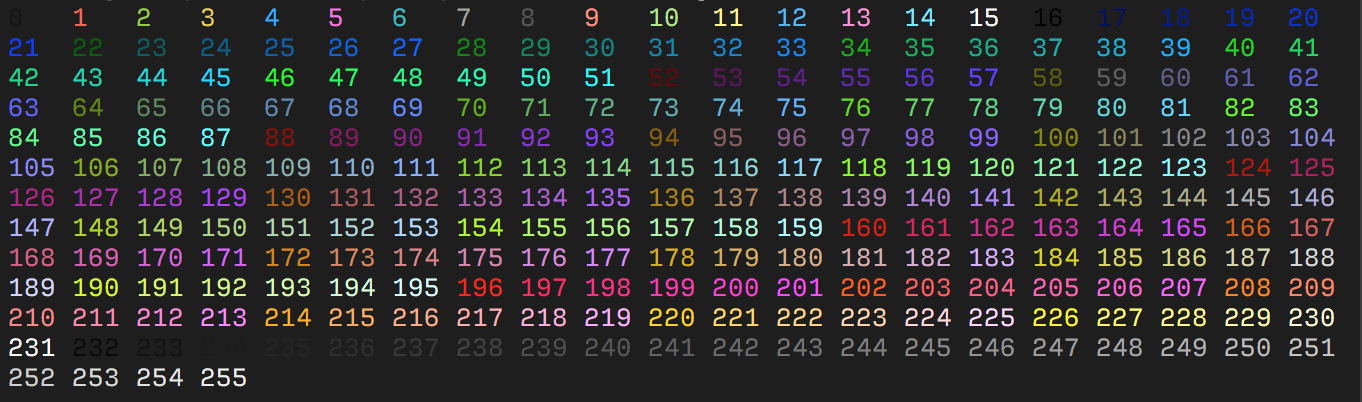
Where `{ID}` should be replaced with the color index from 0 to 255 of the following color table:
|
|
|
|
|
|
|
|
The table starts with the original 16 colors (0-15).
|
|
The proceeding 216 colors (16-231) or formed by a 3bpc RGB value offset by 16, packed into a single value.
|
|
The final 24 colors (232-255) are grayscale starting from a shade slighly lighter than black, ranging up to shade slightly darker than white.
|
|
Some emulators interpret these steps as linear increments (`256 / 24`) on all three channels, although some emulators may explicitly define these values.
|
|
|
|
|
|
##### RGB Colors
|
|
|
|
More modern terminals supports [Truecolor](https://en.wikipedia.org/wiki/Color_depth#True_color_.2824-bit.29) (24-bit RGB), which allows you to set foreground and background colors using RGB.
|
|
These escape sequences are usually not well documented.
|
|
|
|
| ESC Code Sequence | Description |
|
|
| :---------------------- | :--------------------------- |
|
|
| `ESC[38;2;{r};{g};{b}m` | Set foreground color as RGB. |
|
|
| `ESC[48;2;{r};{g};{b}m` | Set background color as RGB. |
|
|
|
|
> Note that `38` and `48` corresponds to the 16 color sequence and is interpreted by the terminal to set the foreground and background color respectively.
|
|
> Where as `;2` and `;5` sets the color format.
|
|
|
|
|