
5.9 KiB
Terminal
ANSI escape sequences
Ansi escape sequences are used to format output in a terminal. They are prefixed with an escape character, which can be written in a few ways:
- Ctrl-Key
^[ - Octal
\033(\0 for octal) - Hexadecimal
\x1B(\x for hexadecimal) - Unicode
\u001b
The sequences is started with a [ followed by the command and arguments. Arguments are separated with ;. Sequences are terminated with m.
# Example:
\x1b[1;31m  # Set style to bold, red foreground.
For the following tables we define ESC = \x1B
Text Style
| ESC Code Sequence | Reset Sequence | Description |
|---|---|---|
ESC[1;34;{...}m |
Set graphics modes for cell, separated by semicolon (;). |
|
ESC[0m |
reset all modes (styles and colors) | |
ESC[1m |
ESC[22m |
set bold mode. |
ESC[2m |
ESC[22m |
set dim/faint mode. |
ESC[3m |
ESC[23m |
set italic mode. |
ESC[4m |
ESC[24m |
set underline mode. |
ESC[5m |
ESC[25m |
set blinking mode |
ESC[7m |
ESC[27m |
set inverse/reverse mode |
ESC[8m |
ESC[28m |
set hidden/invisible mode |
ESC[9m |
ESC[29m |
set strikethrough mode. |
Note: Some terminals may not support some of the graphic mode sequences listed above.
Note: Both dim and bold modes are reset with the
ESC[22msequence. TheESC[21msequence is a non-specified sequence for double underline mode and only works in some terminals and is reset withESC[24m.
Color codes
Most terminals support 8 and 16 colors, as well as 256 (8-bit) colors. These colors are set by the user, but have commonly defined meanings.
8-16 Colors
| Color Name | Foreground Color Code | Background Color Code |
|---|---|---|
| Black | 30 |
40 |
| Red | 31 |
41 |
| Green | 32 |
42 |
| Yellow | 33 |
43 |
| Blue | 34 |
44 |
| Magenta | 35 |
45 |
| Cyan | 36 |
46 |
| White | 37 |
47 |
| Default | 39 |
49 |
| Reset | 0 |
0 |
Note: the Reset color is the reset code that resets all colors and text effects, Use Default color to reset colors only.
Most terminals, apart from the basic set of 8 colors, also support the "bright" or "bold" colors. These have their own set of codes, mirroring the normal colors, but with an additional ;1 in their codes:
# Set style to bold, red foreground.
\x1b[1;31mHello
# Set style to dimmed white foreground with red background.
\x1b[2;37;41mWorld
Terminals that support the aixterm specification provides bright versions of the ISO colors, without the need to use the bold modifier:
| Color Name | Foreground Color Code | Background Color Code |
|---|---|---|
| Bright Black | 90 |
100 |
| Bright Red | 91 |
101 |
| Bright Green | 92 |
102 |
| Bright Yellow | 93 |
103 |
| Bright Blue | 94 |
104 |
| Bright Magenta | 95 |
105 |
| Bright Cyan | 96 |
106 |
| Bright White | 97 |
107 |
256 Colors
The following escape codes tells the terminal to use the given color ID:
| ESC Code Sequence | Description |
|---|---|
ESC[38;5;{ID}m |
Set foreground color. |
ESC[48;5;{ID}m |
Set background color. |
Where {ID} should be replaced with the color index from 0 to 255 of the following color table:
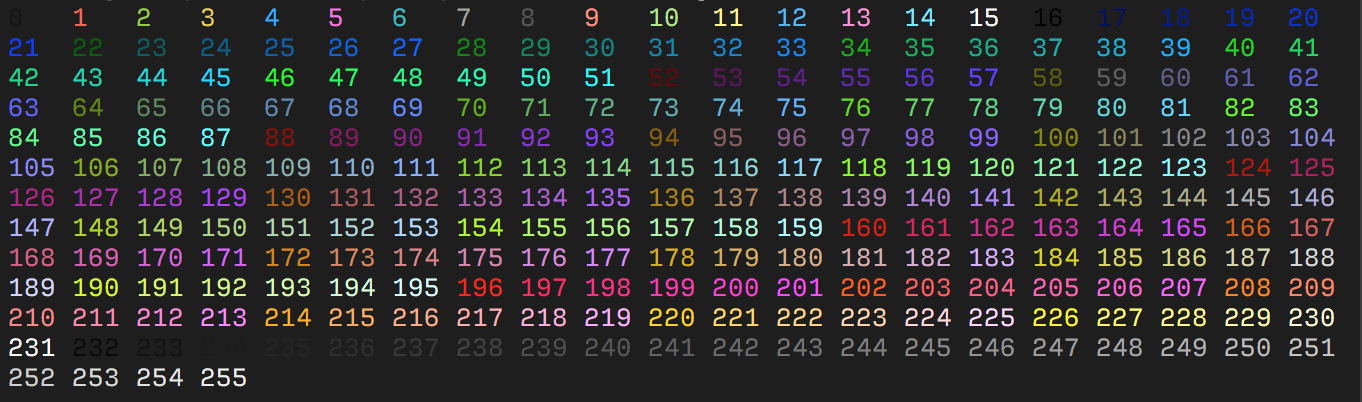
The table starts with the original 16 colors (0-15).
The proceeding 216 colors (16-231) or formed by a 3bpc RGB value offset by 16, packed into a single value.
The final 24 colors (232-255) are grayscale starting from a shade slighly lighter than black, ranging up to shade slightly darker than white.
Some emulators interpret these steps as linear increments (256 / 24) on all three channels, although some emulators may explicitly define these values.
RGB Colors
More modern terminals supports Truecolor (24-bit RGB), which allows you to set foreground and background colors using RGB.
These escape sequences are usually not well documented.
| ESC Code Sequence | Description |
|---|---|
ESC[38;2;{r};{g};{b}m |
Set foreground color as RGB. |
ESC[48;2;{r};{g};{b}m |
Set background color as RGB. |
Note that
38and48corresponds to the 16 color sequence and is interpreted by the terminal to set the foreground and background color respectively. Where as;2and;5sets the color format.